What does a modern scheduling environment actually look like?

Most institutions have a scheduling system. Very few have a scheduling environment — an integrated set of capabilities and systems that connects curriculum planning through to student timetable delivery. Click any box to explore its features and a five-point checklist.

Click any system or capability in the diagram to jump to its description and checklist below.
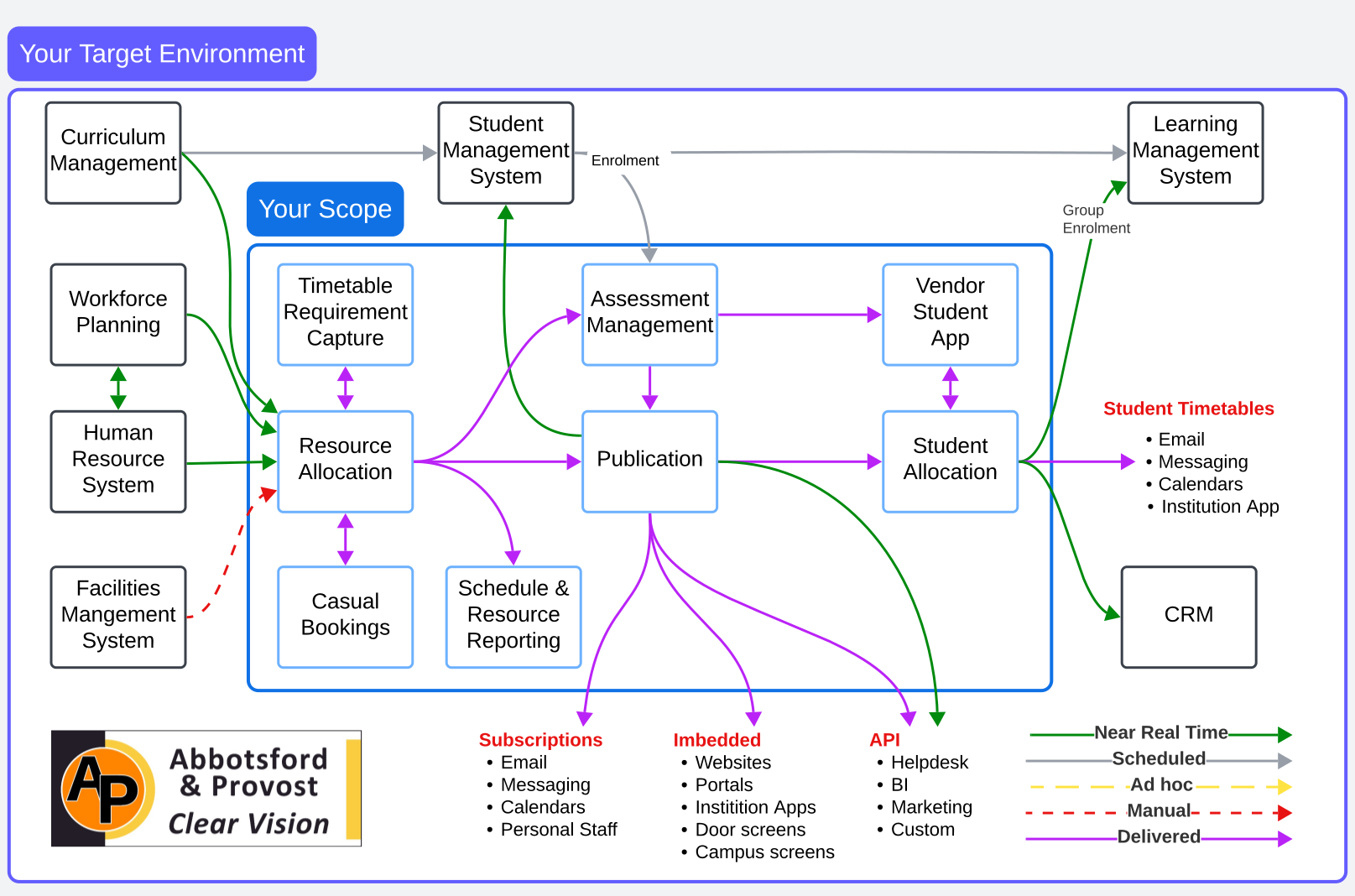
Near real-time
Scheduled
Ad hoc
Manual
Delivered integration

Jump to a system or capability

Core Scheduling Capability

Timetable Requirement Capture

Collects, manages and tracks scheduling requirements from schools and faculties — the room, resource and activity specifications that scheduling needs to build the timetable. This is a high-friction capability: most universities still rely on email, spreadsheets and manual follow-up, making it a persistent source of conflict between scheduling teams and faculties.

Key features

  • Structured requirement forms pre-populated from the previous year's schedule (rollover) or from integrated systems such as curriculum management and student management
  • Workflow and case-management style tracking — so every requirement has a status, an owner and a due date, and nothing falls through the cracks
  • Status reporting for scheduling managers — what has been submitted, what is outstanding, what has changed, and what is blocking the build
  • Support for both initial requirements and post-publication changes — with appropriate approval and prioritisation workflows for changes after the timetable is released
  • Integration with curriculum management to automatically generate activity requirements from approved courses
  • Integration with student management for enrolment-driven demand — class sizes and group numbers informed by actual or projected enrolments
  • Escalation and reminder mechanisms to drive faculty compliance with submission deadlines

Five things to check or do

  1. Are requirement forms pre-populated from the previous year's schedule or from curriculum and student management systems — or do faculties complete them from scratch every semester?
  2. Does every submitted requirement have a status that the scheduling team and the submitting faculty can both see — or is progress tracked in spreadsheets and email threads?
  3. Is there a formal, system-supported process for post-publication change requests — with approval, prioritisation and impact assessment built in?
  4. Can you produce a real-time report showing which schools have submitted requirements, which are outstanding, and which are blocking the timetable build?
  5. Is the gap between what faculties request and what scheduling can deliver managed through a structured negotiation process — or resolved informally through direct contact between individuals?
Talk to us about this capability →
Core Scheduling Capability

Resource Allocation

The core scheduling engine — allocating rooms, staff and equipment to activities based on constraints, preferences and institutional rules.

Key features

  • Rule-based automated allocation using institutional constraints and preferences
  • Manual override capability with conflict detection and explanation
  • Clash detection across students, staff and rooms in real time
  • Utilisation reporting and optimisation suggestions
  • Multi-campus and cross-faculty scheduling support
  • Integration with HR for live staff availability and workload tracking
  • Scenario modelling — test allocation options before committing

Five things to check or do

  1. Is your scheduling rule set formally documented and maintained — or does institutional knowledge live only in the heads of experienced schedulers?
  2. Does your system detect and report clashes in real time, or are clashes only discovered after the timetable is published?
  3. Can you produce a utilisation report showing room and staff allocation rates by faculty, campus and time period?
  4. Are scheduling rules enforced by the system, or do they rely on manual discipline to apply consistently?
  5. Is there a formal process for requesting and approving post-publication changes — or do changes happen informally and get lost?
Talk to us about this capability →
Core Scheduling Capability

Casual Bookings

Manages ad hoc room and resource requests outside the structured timetable — events, meetings, one-off classes and external bookings.

Key features

  • Self-service booking portal for staff and approved external users
  • Real-time room availability checking against the timetable
  • Approval workflows for high-demand or restricted spaces
  • Integration with facilities management for room setup and catering
  • Invoicing and charge-back capability for external and commercial bookings
  • Reporting on casual vs timetabled utilisation by space

Five things to check or do

  1. Is your casual bookings system integrated with your timetable — so that ad hoc bookings cannot clash with scheduled classes?
  2. Do you have a self-service portal for staff to request rooms, or does all booking go through a central team?
  3. Can you report on what proportion of your space utilisation comes from casual vs timetabled activity?
  4. Are commercial or external bookings tracked separately, with appropriate charge-back or invoicing?
  5. Is there a clear policy defining who can book what spaces, and is that policy enforced by the system?
Talk to us about this capability →
Core Scheduling Capability

Assessment Management

Manages examination and assessment scheduling — from requirement capture through room allocation, invigilator assignment and student notification.

Key features

  • Exam requirement capture linked to course and enrolment data
  • Automated clash detection across student enrolments
  • Room allocation for examinations with seating plan generation
  • Invigilator scheduling and workload management
  • Special consideration and accessibility requirement management
  • Student notification and personalised exam timetable delivery
  • Integration with student management system for live enrolment data

Five things to check or do

  1. Is exam scheduling integrated with your enrolment system — so student clash detection uses live enrolment data, not a snapshot?
  2. Are special consideration and accessibility requirements captured in the system and automatically factored into room allocation?
  3. Do students receive personalised exam timetables through a digital channel, or are they still reading a published PDF?
  4. Can you track invigilator hours and workload through the system to manage both cost and compliance?
  5. Is there a formal process for late enrolment changes that ensures the exam timetable remains accurate?
Talk to us about this capability →
Core Scheduling Capability

Publication

Controls the release of timetable data to students, staff and downstream systems — managing what is published, when, and through which channels.

Key features

  • Controlled release workflow — draft, review, approve, publish
  • Version management with change tracking and rollback capability
  • Targeted publication by faculty, cohort or campus
  • Multi-channel distribution — subscriptions, embedded, API
  • Change notification to affected students and staff
  • Publication audit trail for compliance and governance

Five things to check or do

  1. Is there a formal approval process before timetable data is published to students — or can changes be made and released without review?
  2. When timetable changes are published, are affected students and staff automatically notified through their preferred channel?
  3. Do you maintain a version history of published timetables — so you can establish what a student was told and when?
  4. Can you target publication to specific cohorts — publishing faculty timetables separately as they are confirmed?
  5. Is your publication process integrated with your downstream channels (app, portal, LMS) — or does each channel require a separate manual update?
Talk to us about this capability →
Core Scheduling Capability

Schedule & Resource Reporting

Provides operational and strategic reporting on scheduling outcomes, resource utilisation, compliance and the gap between planned and actual activity.

Key features

  • Real-time utilisation dashboards — rooms, staff, equipment by period and campus
  • Planned vs actual delivery reporting for compliance and financial reconciliation
  • Trend analysis across semesters for capacity planning
  • Faculty and course-level cost reporting using actual scheduling data
  • Regulatory compliance reporting — scheduled and actual hours
  • Integration with BI platforms for enterprise reporting
  • Self-service reporting for faculty and departmental users

Five things to check or do

  1. Can you report on actual room utilisation — not just what was scheduled, but what was actually used — by period, campus and faculty?
  2. Do you have a reliable reconciliation of planned teaching hours against actual hours delivered — and is this used for financial and compliance reporting?
  3. Can faculty and department managers access their own utilisation and scheduling data without submitting a request to the scheduling team?
  4. Is your scheduling data connected to your enterprise BI platform — or does reporting rely on scheduled exports and manual manipulation?
  5. Do your reports meet the regulatory requirements for actual activity data — under enterprise agreements, government funding rules and OHS obligations?
Talk to us about this capability →
Core Scheduling Capability

Student Allocation

Allocates individual students to specific classes, tutorials and activities — replacing manual student personal timetables with automated, preference-aware allocation.

Key features

  • Automated allocation based on enrolment, preferences and constraints
  • Student preference capture — work commitments, carer obligations, campus preferences
  • Clash detection across a student's full enrolled programme
  • Manual override for complex cases with audit trail
  • Waitlist management for over-subscribed classes
  • Integration with Student Management System for live enrolment data
  • Personalised timetable generation per student

Five things to check or do

  1. Does your student allocation process use live enrolment data — or are students allocated based on a snapshot that may be days or weeks old?
  2. Do you capture student obligations (work commitments, carer responsibilities, disability requirements) before allocation — or discover them through complaints after the timetable is released?
  3. Is student allocation automated, or does your team manually assign students to classes — and if so, how many students does each staff member manage?
  4. Can you identify and resolve clashes in a student's programme before publication — or do students have to find and report their own clashes?
  5. Is there a self-service mechanism for students to swap between classes within defined rules — without requiring staff intervention?
Talk to us about this capability →
Core Scheduling Capability

Vendor Student App

Delivers personalised timetables and scheduling information to students through a mobile app — providing real-time updates, notifications and calendar integration.

Key features

  • Personalised student timetable in a mobile-first interface
  • Push notifications for timetable changes and cancellations
  • Integration with device calendars (iOS, Android, Outlook)
  • Campus maps and room location information
  • Real-time updates from publication system
  • Accessibility compliance — screen reader support, large text
  • Offline access to last-synced timetable data

Five things to check or do

  1. Does your student app receive timetable updates in near real time — so students see changes within minutes, not hours or days?
  2. Do students receive push notifications when their timetable changes — not just an email they may not read for days?
  3. Can students sync their university timetable to their personal calendar (Google, Apple, Outlook) directly from the app?
  4. Is the app accessibility-compliant — tested with screen readers and meeting WCAG 2.1 AA standards?
  5. Do you track app adoption rates — and do you know what proportion of your students are actually using it for their timetable?
Talk to us about this capability →
Institutional System

Student Management System

The source of truth for student enrolment, course completion and academic record — the primary upstream data source for student allocation and timetabling.

Key features

  • Live enrolment data feed to scheduling and student allocation systems
  • Course completion and prerequisite tracking for accurate scheduling eligibility
  • Student status data — full-time, part-time, online, on-campus
  • Group enrolment to Learning Management System
  • Integration with scheduling for accurate demand planning

Five things to check or do

  1. Is your enrolment data fed to your scheduling system in near real time — so timetable clash detection is always working with current data?
  2. Does your scheduling system receive student status information (full-time, part-time, online) — and is this used to influence allocation rules?
  3. Is there a defined data ownership and data quality agreement between the scheduling team and the SMS team?
  4. Are late enrolment changes automatically reflected in student allocation — or does the scheduling team need to manually manage each change?
  5. Is the integration between SMS and scheduling system documented, tested and covered by a formal service level agreement?
Talk to us about this system →
Institutional System

Curriculum Management

The upstream source of course and programme definitions — where the teaching resource requirements for scheduling should originate.

Key features

  • Course and programme catalogue with resource requirement fields
  • Curriculum approval workflow with scheduling impact assessment
  • Integration with scheduling for automatic activity generation
  • Version management for curriculum changes across academic years
  • Accreditation and compliance requirement tracking

Five things to check or do

  1. Does your curriculum approval process require scheduling resource requirements — room type, staff expertise, activity duration — to be specified before approval?
  2. Is there a formal integration between your curriculum management system and your scheduling system — or is curriculum data re-entered manually?
  3. When a course is modified in curriculum management, does the scheduling system automatically reflect the change — or does someone need to make the update?
  4. Can your scheduling team see upcoming curriculum changes before the semester begins — so they can plan resource implications in advance?
  5. Is the scheduling impact of curriculum decisions assessed as part of the curriculum approval process — or discovered later when the timetable is being built?
Talk to us about this system →
Institutional System

Workforce Planning

Models future teaching demand and resource requirements — including roles that may not yet exist or be filled. Connects planned curriculum demand to the resource supply chain, enabling budgets and timetables to be built on realistic resourcing assumptions.

Key features

  • Modelling of teaching demand from approved curriculum — including planned but unfilled roles
  • Scenario planning for different enrolment levels and delivery modes
  • Resource utilisation analysis — planned vs actual teaching load by faculty and school
  • Rolling multi-year resource planning aligned to curriculum change
  • Integration with HR for confirmed staff data and with curriculum for demand inputs
  • Identification of resourcing gaps before the semester — not after enrolment

Five things to check or do

  1. Does your institution have a formal workforce planning process that connects curriculum-driven teaching demand to resource supply — before the timetable is built?
  2. Can you model teaching demand for roles that are planned but not yet filled — so resourcing gaps are visible at curriculum approval, not discovered at scheduling time?
  3. Is your workforce planning data connected to your scheduling system — so that planned resources flow through to timetable requirement capture automatically?
  4. Do you produce multi-year resource plans that reflect approved curriculum changes — or is resource planning done semester by semester in isolation?
  5. Is actual resource utilisation tracked and fed back into workforce planning — so that the model is continuously calibrated against reality?
Talk to us about this system →
Institutional System

Human Resource System

The source of truth for actual employees and contractors — confirming who exists, what their contract entitlements are, what they are qualified to teach, and when they are available. HR feeds confirmed staff data into Workforce Planning and directly into Resource Allocation.

Key features

  • Confirmed staff records — employees and contractors actually engaged by the institution
  • Contract type and workload entitlement data for compliance management
  • Teaching qualification and expertise data for activity-staff matching
  • Leave and absence data for real-time availability in scheduling
  • Actual hours worked feed for financial reconciliation and compliance reporting
  • Integration with Workforce Planning for confirmed supply data

Five things to check or do

  1. Does your scheduling system receive confirmed staff availability from your HR system in near real time — or does the scheduling team maintain a separate spreadsheet of who is available and when?
  2. Are staff teaching workload entitlements enforced by the scheduling system — or does compliance rely on manual checking after the timetable is built?
  3. Is the gap between scheduled hours and actual hours delivered visible to both the scheduling team and HR — and used for financial and compliance reporting?
  4. When a staff member takes leave or their contract changes, does this automatically update their availability in the scheduling system?
  5. Are staff qualifications and teaching expertise maintained in HR in a structured form the scheduling system can use — or are they recorded as free text that requires manual interpretation?
Talk to us about this system →
Institutional System

Facilities Management System

The source of room and space data — capacity, type, equipment and availability — that underpins physical resource allocation.

Key features

  • Room inventory with capacity, type and equipment attributes
  • Room availability feed to scheduling system
  • Maintenance and closure scheduling integration
  • Room setup and configuration management
  • Space utilisation reporting and optimisation

Five things to check or do

  1. Is your room inventory in your scheduling system accurate and up to date — including capacity, equipment and accessibility attributes?
  2. When a room is taken offline for maintenance or refurbishment, is this automatically reflected in scheduling availability — or does someone have to manually block the room?
  3. Do you have a defined process for reviewing and updating room attributes when spaces are refurbished or repurposed?
  4. Is space utilisation data from your scheduling system used to inform facilities planning and capital investment decisions?
  5. Is there a formal integration — or at minimum a defined data exchange process — between your facilities management system and your scheduling system?
Talk to us about this system →
Institutional System

Learning Management System

The downstream academic delivery platform — receives group enrolment data from the Student Management System to ensure students have access to the right course materials.

Key features

  • Group enrolment data received from Student Management System
  • Course site creation and population based on enrolment data
  • Integration with student timetable for activity links and recordings
  • Academic resource and content delivery

Five things to check or do

  1. Is group enrolment to your LMS automated from your SMS — or do academic staff manually enrol students into LMS course sites?
  2. Are LMS course sites created and ready before the first day of semester — with all enrolled students already loaded?
  3. When students add or drop courses, is the LMS enrolment updated automatically — or are there students accessing course sites they should not, or locked out of sites they should have?
  4. Is there a defined turnaround time for LMS access after enrolment — and is that commitment being met?
  5. Is the LMS integration documented and tested at the start of each academic cycle?
Talk to us about this system →
Institutional System

CRM

Receives student timetable and engagement data to support marketing, student success and retention activities.

Key features

  • Student timetable data for personalised communications
  • Enrolment and engagement data for retention modelling
  • Integration with student allocation for programme completion tracking
  • Marketing campaign management based on student cohort and timetable data

Five things to check or do

  1. Does your CRM receive current student enrolment and timetable data — or is it working from data that is days or weeks out of date?
  2. Is student timetable data used to personalise outreach — for example, identifying students with timetable clashes or scheduling conflicts that may affect retention?
  3. Are there defined use cases for scheduling data in your CRM — and is the data quality sufficient to support those use cases?
  4. Is there a privacy and consent framework governing the use of student scheduling data in marketing and retention activities?
  5. Is the CRM integration covered by your data governance framework — with defined data ownership, refresh frequency and quality standards?
Talk to us about this system →

Before you can realise the benefits of this environment, your data needs to be ready.

Every system in the target environment depends on complete, consistent and trustworthy data. In most institutions, scheduling data is the hidden constraint — incomplete, inconsistent and too poor to support AI, automated allocation or reliable financial reporting.

Data quality assessment →
Talk to us

Want to map your environment
against this target?

We work with scheduling teams and institutional leaders to assess the current state, design the target environment and build the business case to get there.